A great podcast isn’t just about audio anymore. Even audio-first shows are shared and judged visually across platforms. That’s why a solid podcast studio lighting setup is essential. Good lighting makes your show look professional, trustworthy, and intentional before a single word is heard.
This guide is practical and hands-on: you’ll learn how to create a repeatable lighting setup for small rooms, limited budgets, and multiple hosts, avoiding common mistakes while achieving a consistent look episode after episode.
Why Podcast Lighting Setup Matters for Production Quality
Podcast lighting is about clarity and comfort. The goal isn’t dramatic shadows or flashy visuals, it’s to make faces readable, skin tones natural, and expressions clear. Viewers subconsciously decide whether to keep watching within seconds, and lighting plays a major role in that decision.
Good podcast lighting reduces visual fatigue. When light is soft and balanced, viewers stay longer, and hosts feel more relaxed on camera. Poor lighting, on the other hand, creates harsh shadows, glare, and distractions that quietly push people away.
Lighting directly affects exposure. When light is insufficient, cameras boost ISO, introducing grain and noise. When lighting is uncontrolled, highlights blow out and skin looks unnatural. Both issues immediately reduce perceived quality. Beyond exposure, lighting creates separation. A well-lit subject stands out from the background, holding viewer attention longer. This separation subtly increases engagement, especially in long conversations.
Common signs of bad lighting:
- Faces look flat or lifeless
- Dark shadows under eyes
- Reflections on glasses or desks
- Bright, distracting backgrounds
The Complete Podcast Studio Lighting Setup
A podcast lighting setup should be boring in the best way possible. When it works, you don’t think about it and you just press record. Consistency matters more than creativity here. The best setups are repeatable, forgiving, and easy to recreate even if equipment is moved slightly. The key principle is control.
Control over where light comes from, where it doesn’t go, and how it interacts with faces and backgrounds. Once you achieve that control, even simple lighting setups can look polished and intentional. A well-designed podcast studio lighting setup doesn’t require complexity. It requires intention. Whether you’re working with one light or three, the logic stays the same: shape the face first, then manage the space.

One-Light Setup
This is the fastest and most efficient option. A single soft key light placed slightly to the side of the camera creates natural facial depth. Any remaining shadows are softened using bounce from walls or a simple reflector. This setup works best for solo hosts and small rooms.
Two-Light Setup
Two lights allow you to choose between balance or depth. A key plus fill creates even, clean lighting for tight spaces. A key plus background light adds separation when the room feels visually flat. Use this when you want control without complexity.
Three-Light Setup
The classic three-point approach adds a subtle back or hair light for separation. The goal is not a dramatic outline, but gentle depth. If the back light draws attention to itself, it’s too strong.
Placement Principle
The key light should generally sit slightly above eye level and off to one side. This simple angle shapes the face naturally and avoids harsh shadows.
Multi-Host Considerations
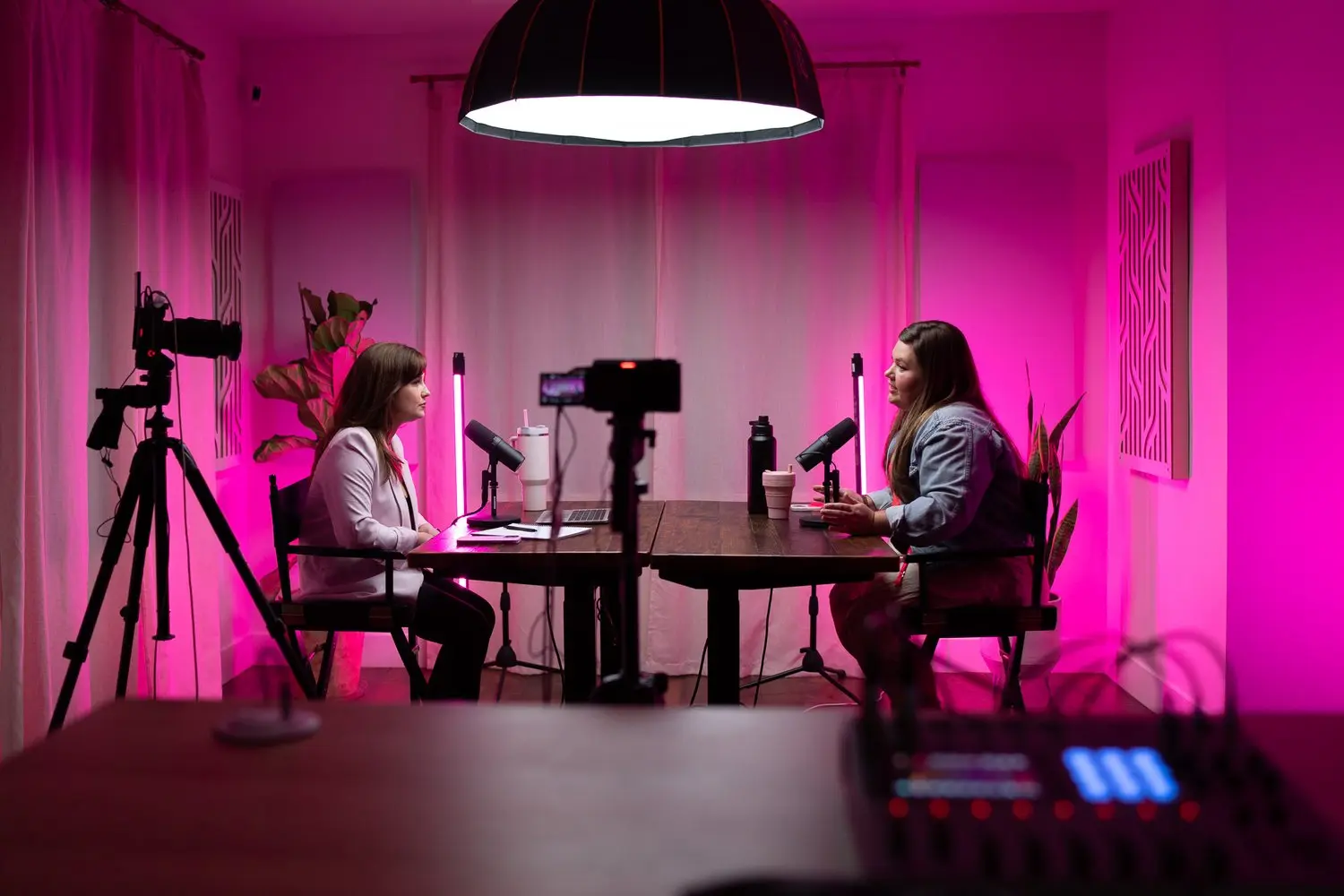
In multi-host shows, lighting should feel shared. Avoid placing strong lights that cast shadows onto the second host. Large, soft sources help keep faces evenly readable across the frame.
Podcast Lighting Diagrams
When people talk about a podcast lighting diagram, they’re really talking about understanding spatial logic, where lights sit in relation to faces and cameras. A podcast lighting setup diagram is useful because it forces you to think in top-down and front-facing terms. Solo hosts benefit from angled key placement.
Two-host setups work best when lighting is symmetrical or shared. Interview setups require separate keys to avoid uneven exposure. What matters most isn’t the diagram itself, but consistency in angles, height, and distance.
Video Podcast Lighting Setup: How to Light a Video Podcast
A video podcast lighting setup differs from audio-only recording in three important ways. First, framing is wider. More of the room appears on camera, so backgrounds matter. Second, multiple faces must be evenly lit. Third, visual storytelling becomes part of the experience.
If you’re wondering how to light a video podcast, start by deciding on a look.
Clean Look: Neutral lighting, soft shadows, bright but controlled background.
Cozy Look: Slightly warmer light, darker background, relaxed contrast.
Cinematic Look: Stronger key light, minimal fill, darker surroundings.
Quick fixes:
- Table glare → raise or soften the key
- Glasses reflections → increase light height
- Background hotspots → move background light farther away

Podcast Lighting Color Temperature & Mood
Color temperature defines mood more than brightness. Warm light feels intimate and conversational. Neutral light feels honest and professional. Cool light feels modern but can feel distant if overused.
Choose one temperature and commit to it. Mixing light temperatures creates visual confusion and skin tone issues.
Rule: Pick a baseline and match everything to it.
If windows are present, either match daylight or block it entirely.
Podcast Lighting Tips: Mini Troubleshooting
Even the best lighting setup can face issues. Hosts move, glasses reflect, and cameras react differently to skin tones and settings. Troubleshooting isn’t about redesigning your studio, it’s about small, fast adjustments.
Most problems come from light angle, height, or color, not missing equipment. Once you understand how light behaves on faces and surfaces, fixes become intuitive, letting you focus on the conversation instead of the setup.
- Harsh under-eye shadows call for raising the key light slightly
- flat, lifeless face calls for moving the key light off-axis
- glasses glare call for lifting and angling the light downward
- background too bright or too dark call for adjusting the distance of the light
- mixed color temperatures call for eliminating one source
- flicker or banding call for adjusting the camera shutter
- off-looking skin tones call for resetting the white balance
- cross-shadows on co-host call for widening the light source
Podcast Studio Lighting Setup on Any Budget
A professional-looking podcast doesn’t require expensive gear, it depends on intentional lighting. Even on a minimal budget, a single soft key light with natural wall bounce can produce clean, flattering results.
As budgets increase, adding a second light helps control contrast or separate the subject from the background. Higher-end setups mainly add refinement, smoother transitions, and better consistency rather than changing the core result.
The smartest approach is to scale gradually. Start with the best key light you can afford, since it defines how faces appear on camera.
Mid-level setups benefit from a fill or background light to improve balance, while professional setups add subtle separation and polish. At any budget level, softness, placement, and consistency matter more than the number of lights. If only one upgrade is possible, improving the softness and quality of the key light delivers the biggest impact.
A podcast studio lighting setup can scale easily.
- Minimum: One soft key and bounce
- Mid: Key plus fill or background
- Pro: Full separation with three lights

Podcast Lighting Setup Workflow
A repeatable workflow turns lighting from a constant frustration into a reliable system. Instead of guessing before every recording, a structured process keeps your look consistent across episodes and makes adjustments predictable. This matters even more for podcasts with frequent recordings or multiple hosts, where small lighting changes become noticeable over time.
A clear workflow also improves team coordination and significantly reduces setup time.
The process starts by removing competing light sources. Next, place the key light to shape the face. Add fill or bounce to manage contrast, then introduce a background or back light if separation is needed.
Set color temperature only after all lights are positioned to keep tones consistent. Record a short test clip to confirm the look. Once everything is dialed in, document or mark the setup so it can be recreated easily. This turns lighting from a creative choice into a dependable production standard.
A reliable podcast studio lighting setup follows a repeatable workflow:
- Remove mixed light sources
- Place the key light
- Add fill or bounce
- Add background or back separation
- Set color temperature
- Record a 10-second test
- Save the setup for reuse
This process turns lighting from a guessing game into a system.

Ready to Make Your Lighting Effortless?
If you want a lighting setup that’s actually built around your space, camera, and show format, Helio goes far beyond generic advice. Helio designs clean, repeatable podcast lighting systems and provides access to fully equipped studios with modern, up-to-date lighting and production gear. Whether you’re recording in a dedicated studio or need a flexible rental space, everything is designed for consistency, speed, and professional results.
But Helio isn’t just about studios and equipment. It operates as a full creative and marketing agency, supporting podcasts and brands with a wide range of services, from production and visual setup to branding, content strategy, and marketing execution.
Lighting is just one part of a bigger system designed to help shows look polished, scale smoothly, and grow with intention. Learn more at Helio and build a setup that works reliably, episode after episode.
A Lighting Setup That Works, Every Time
Podcast lighting isn’t about perfection, it’s about intention and consistency. Good lighting quietly signals professionalism and shapes how your show is perceived before anyone listens.
No matter the space, the goal stays the same: natural faces, controlled distractions, and subtle separation from the background. A successful setup is one you can repeat easily, saving time and reducing stress across episodes. Strong results don’t require expensive gear, just a solid key light, consistent color temperature, and a clear workflow. When lighting works seamlessly, it disappears, letting the conversation and connection take center stage.